Routing policies and presets
A routing policy decides which providers may serve a request and how the eligible ones are ranked. You can set policies for the whole gateway, a workspace, a member, an API key and a preset. Each level can only narrow the ones above it.
What a policy can say
The policy editor groups its settings under Sellers, Quality (the minimum trust score, and TEE or verified sellers only), Price limits, Models and Ranking. Its What this level does box states the policy in plain sentences as you edit it, and says how many providers can still serve.
| Setting | Meaning |
|---|---|
| Which sellers may serve | Any seller, or Only these: chosen providers or seller lists |
| Never use, Never use these lists | Providers that never serve |
| Minimum trust score | 0 to 100, from the seller's staking power, recognized usage, verified identity and model checks. The ⓘ next to it in the editor explains the parts. It is judged per model: for a model with a live DIFF model check, a seller counts at 10% of its score, and Sort by trust uses the same number. See Trust score. |
| TEE sellers only | Only providers whose trusted execution environment (TEE) attestation passes on your buyer |
| Verified sellers only | Only providers whose responses pass a verifier, such as a TEE attestation check |
| Sort by | Balanced, Lowest price, Lowest latency or Highest trust. Balanced keeps the buyer's automatic order: the cheapest provider that passes the trust minimum, with trust only breaking ties (see Router plugin API). Lowest latency ranks by time to first token, which the buyer measures per provider and model on streamed answers; providers it hasn't measured yet come after the measured ones. |
| Free sellers first | Rank free providers ahead of paid ones |
| Which models may be used | Any model, or Only these models. Requests for other models get 403 model_not_allowed. |
| Price limits | Maximum input, output and cached-input price per million tokens, and price per image. Without a cached-input limit, the input limit also caps a seller's cached-input price. |
| Fallback chains | For a model, an ordered list of providers to try first. Strict allows only those providers. |
Start from… in the editor offers starting points: Cheapest, Most trusted (trust 70+, ranked by trust), TEE only, or only the providers of one seller list.
Seller lists
A seller list is a named group of providers that a policy allows or blocks in one step: for example the sellers you run yourself, or ones you trust. Organization admins manage them under Routing → Seller lists, or from the policy editor: Manage seller lists opens them all, and clicking a list's name opens that list. Editing a list changes every policy that uses it. The CLI (antseed gateway peer-list) and the management API (/peer-lists) call them peer lists.
TEE sellers only has your buyer check each provider's TEE attestation before sending it a request, even when verification is otherwise optional. Verified sellers only requires a passing check from your buyer's verifier, whichever one the provider supports. Verify TEE providers explains the difference and how to turn verification on.
Policy levels
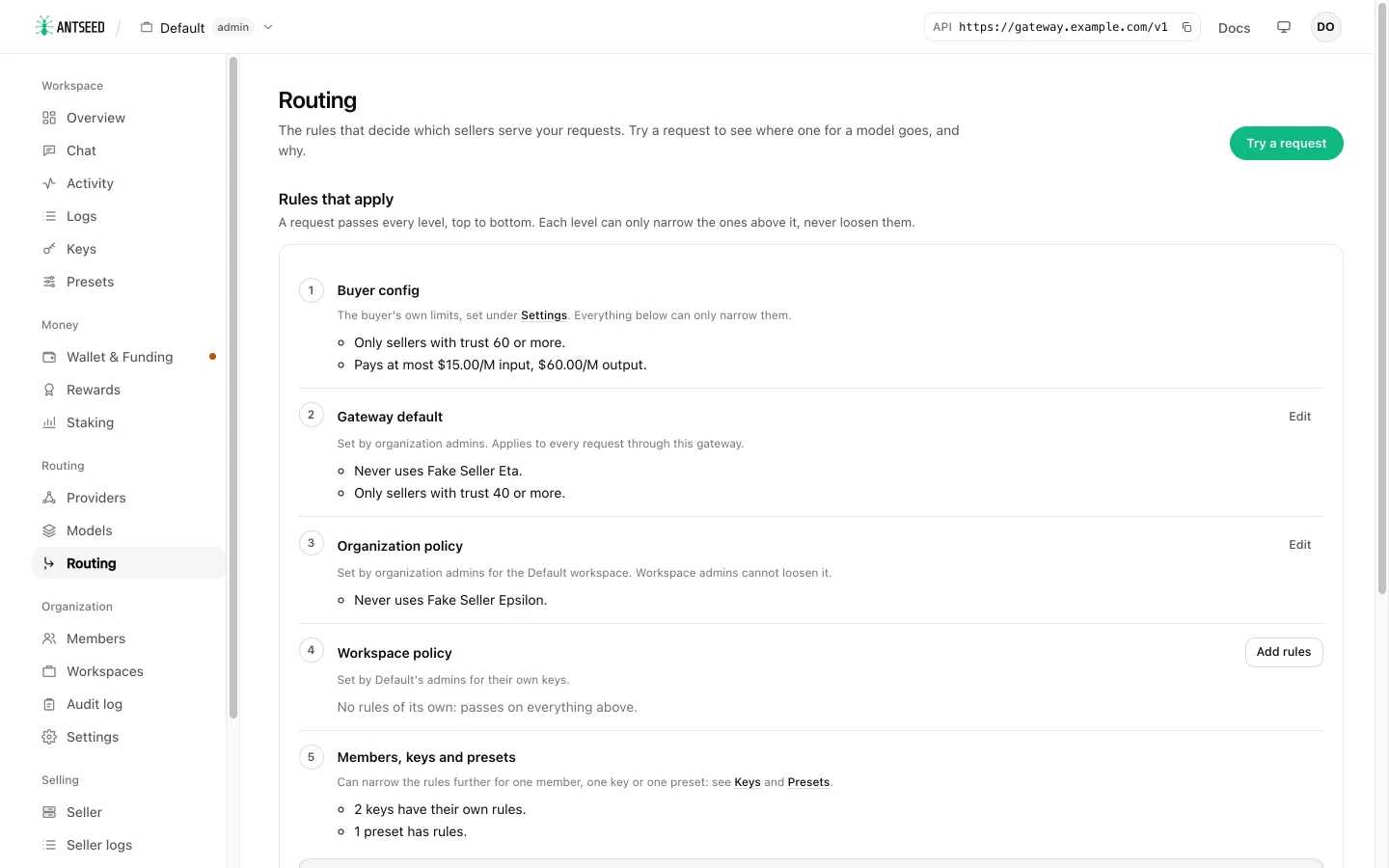
Policies apply in this order:
- Buyer settings: the buyer's own config, under Settings → Buyer (organization admins). Its price caps, minimum trust and reputation, verification and allowed or blocked providers are the top of every policy.
- Gateway default: on Routing, for every request through the gateway.
- Organization policy: a workspace's policy set by organization admins. Workspace admins cannot change it.
- Workspace policy: set by the workspace's own admins, on top of the organization policy.
- The member who owns the key.
- The API key: the admins' layer, then the key owner's own layer.
- The preset, if the request uses one.
Each level only narrows the ones above it:
- Allow lists intersect, and block lists add up.
- Minimums take the higher value, and price caps the lower one.
- TEE sellers only and Verified sellers only stay on once any level turns them on.
- Ranking choices (sort, free first, fallback chains) take the most specific level that sets them.
A member can therefore never give their own key more than their workspace allows. The default minimum trust score in the buyer settings is 60, so a lower minimum at a gateway level has no effect until you lower the buyer's. If providers you expect are missing, check Settings → Buyer first.
Policies also apply to pinned requests (<peerId>@<model>): a client cannot get around a policy by pinning a provider.
Edit policies
- Routing lists every level under Rules that apply, top to bottom, each one in plain sentences ("Never uses …", "Only sellers with trust 40 or more"). The list ends with Effective for the workspace: what keys in the workspace get before member, key and preset policies narrow it. Edit (or Add rules) opens a level's editor; members see the levels they cannot change read-only.
- Members and Keys have a policy section when you edit a member or a key.
- On Providers, Allow, Prefer and Block add one provider to the policy at the scope you choose and keep the rest of that policy. See Models and providers.
When a save would leave no provider able to serve, or asks for more than the levels above allow, the console asks you to confirm.
Try a request
Try a request on the Routing page opens a dialog that shows the route for one model. Choose the model from a searchable list; it starts with your first starred model, or else the most offered one. Choose who is asking: the workspace, a key, a member or a preset.
The result appears at once:
- the providers that would serve the request, in the order they are tried, with the numbers routing ranks them by;
- with All, each filtered-out provider with its reason, and the level whose rule keeps it out, for example Gateway default blocks it, or Buyer config requires trust 60+ (it has 55).
After you try a model, each level in Rules that apply says how many of its providers that level keeps out.
How automatic routing picks a seller
Among the providers a policy allows, the buyer ranks by what it has seen them do. With buyer routing preferences set, it ranks by the expected cost of one good answer: the price plus the time it takes, divided by the share of requests the provider answered recently. Providers within 30% of the best share the traffic, cheaper and more reliable ones more often, and requests of one conversation stay on one provider so its prompt cache keeps working. Without routing preferences it ranks by trust. A policy's Cheapest or Lowest latency sort and its route chains reorder the list. In every order, providers failing lately go after the healthy ones, and cooling-down ones go last.
To see this for a model, open it on the Models page, or press the ⓘ button next to the model in Chat. Providers lists the providers in range, in the order automatic routing tries them. Switch to All (or press Show them under the list) to add the ones your routing settings filter out, dimmed, each with the reason. For each provider in range it shows:
- the expected cost per good answer;
- the success rate and how many recent requests it is based on (a provider new to this model borrows its record on other models at half weight, and one with no record starts from the success rate the provider reports for its last hour of buyer traffic, capped at 95%, or from 80% when it reports fewer than 10 requests);
- first token and speed;
- its share of the traffic;
- whether a payment channel is open;
- how many requests it is serving.
A failing provider shows its last error. Org admins can Reset history to give it a fresh start. All adds the providers routing filters out, with the reason. Allow… on a filtered-out provider (and Prefer/Block in its ⋯ menu) changes the policy at the level you choose, then says whether it can now serve the model. On the Providers page, pick a model to get a Routing column and the same order. In the chat, Pin sends the conversation to one provider. Try a request on Routing shows the same list.
Every request that routing picked a provider for records why. Open it in Logs to see Why this seller. It says how the provider was picked: drawn from the providers sharing the traffic, the best on its own, kept for the conversation, a probe of a provider with no recent record, a failover after the providers before it failed, or the policy's order. It also shows what the buyer had seen of the provider at that moment. Requests pinned to a provider, and requests logged before this version, show none.
Presets
A preset is a saved model setup: a model, an optional system prompt, default request parameters and an optional routing policy. Clients use one by sending @preset/<slug> as the model.
Create one on Presets with Name, Slug, Model, Available in (one workspace, or all workspaces for organization admins), System prompt and Parameters (JSON).
curl https://gateway.example.com/v1/chat/completions \
  -H "Authorization: Bearer $ANTSEED_API_KEY" \
  -H "Content-Type: application/json" \
  -d '{"model": "@preset/code-review", "messages": [{"role": "user", "content": "Review this diff: …"}]}'
The gateway:
- Replaces the model with the preset's, for example
<peerId>@deepseek-v4-flash. - Puts the preset's system prompt before the client's.
- Merges its parameters under the client's own, so the client's values win.
Presets work on /v1/chat/completions, /v1/messages and /v1/responses. An unknown slug returns 400 preset_not_found.
Codex needs a preset as its model. The Codex tab in a provider's API call panel offers Create preset for this model.
From the command line
antseed gateway routing set --min-trust 30 --max-input-price 5
antseed gateway workspace policy set Research --layer org --require-tee
antseed gateway key policy set <keyId> --allow-model deepseek-v4-flash --sort price
antseed gateway routing preview --model deepseek-v4-flash --workspace Research
antseed gateway preset create --slug coder --name Coder --model deepseek-v4-flash --param temperature=0.2
A policy set replaces the policy at that level unless you add --merge. See Commands for every flag.
Next: Calling the API.