Calling the API
Your gateway serves an OpenAI- and Anthropic-compatible API at /v1. Every request carries an API key, which decides who pays, which budgets and routing policies apply, and where the request is logged.
Create an API key
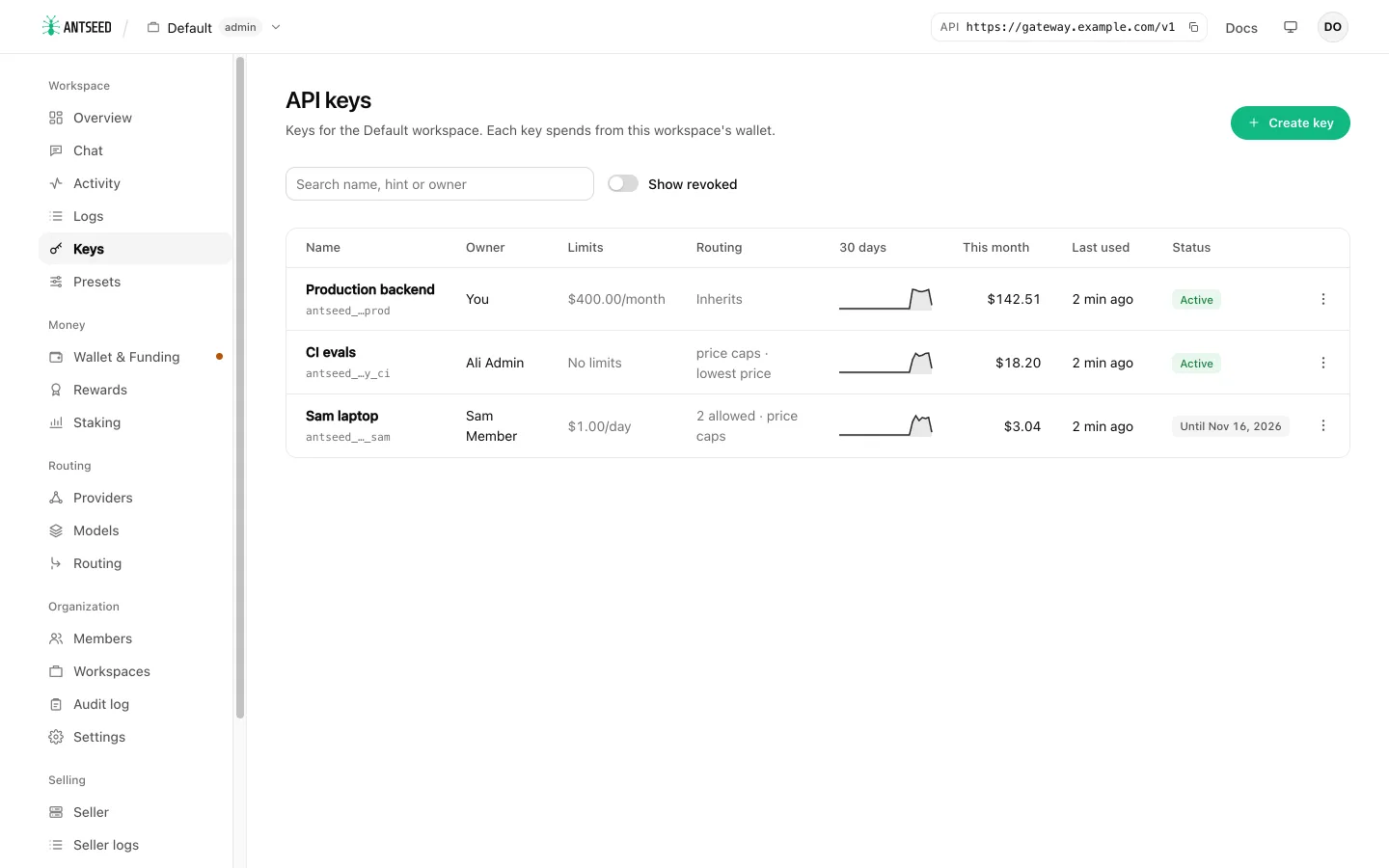
- In the console, open Keys and click Create key.
- Enter a Name. Optionally set budgets, an Expires date, and (for keys with their own wallet) Allow top-ups.
- Click Create key and copy the secret (
antseed_…). It is shown once; the gateway stores only a hash of it.
Every member can create keys in the workspaces they belong to, up to the number an admin allows them. A key spends from its workspace's wallet. Use the row menu to Edit, Rotate secret (a new secret, same key, limits and usage) or Revoke. Changes apply immediately, even while the gateway runs.
On the gateway host you can do the same from the command line:
antseed gateway key create --label "CI" --workspace Research --weekly-limit 25
antseed gateway key list
antseed gateway key rotate <keyId>
antseed gateway key revoke <keyId>
See Commands for every option.
Base URL and key
| Setting | Value |
|---|---|
| Base URL | https://gateway.example.com/v1 on a server, http://localhost:8379/v1 for a local gateway. The console's top bar shows yours. |
| API key | Sent as Authorization: Bearer $ANTSEED_API_KEY. |
| Model | <peerId>@deepseek-v4-flash pinned to one provider, deepseek-v4-flash for automatic routing, or <routerPeerId>@<routerServiceId> to let a routing service choose. See Models and providers. |
export ANTSEED_API_KEY="antseed_…"

curl https://gateway.example.com/v1/chat/completions \
  -H "Authorization: Bearer $ANTSEED_API_KEY" \
  -H "Content-Type: application/json" \
  -d '{"model":"<peerId>@deepseek-v4-flash","messages":[{"role":"user","content":"Hello"}]}'
The same keys work through a tunnel endpoint.
Use a routing service
Name a routing service as the model and it picks the model and provider for each request, among the ones the key's routing policy allows. Add optional router settings in a routing object, in the terms of the router's protocol. For an irp-suggest router, cost_quality_tradeoff goes from 0 (best quality) to 10 (cheapest); without it the router uses its default, 5:
curl https://gateway.example.com/v1/chat/completions \
  -H "Authorization: Bearer $ANTSEED_API_KEY" \
  -H "Content-Type: application/json" \
  -d '{"model":"<routerPeerId>@<routerServiceId>","messages":[{"role":"user","content":"Hello"}],"routing":{"cost_quality_tradeoff":7}}'
With the OpenAI SDK, pass routing as extra_body={"routing": {"cost_quality_tradeoff": 7}}. GET /v1/models?type=router lists the routers the key may use, with the model value, protocol and accepted options for each.
A router counts as a model in the key's policy: a key limited to certain models needs the router's service id in its allow list. Its peer must also pass the policy's provider rules (allow and block lists, minimum trust and reputation, TEE); token and image price caps do not apply to a router, which charges per ranking. A router that is offline answers like an offline provider: 502, peer not reachable. The router's fee and the inference are both charged to the key. See Use a routing service.
Supported routes
| Method | Route | Purpose |
|---|---|---|
GET | /healthz | Whether the gateway is up. Needs no key. |
GET | /v1/models | Models on the network. With a key limited to certain models, only those. Free. |
POST | /v1/chat/completions | OpenAI-compatible chat completions |
POST | /v1/responses | OpenAI Responses API |
POST | /v1/messages | Anthropic-compatible messages |
POST | /v1/messages/count_tokens | Anthropic-compatible token count. Free. |
POST | /v1/images/generations | Image generation |
POST | /v1/images/edits | Image editing, one or more images |
POST | /v1/audio/speech | Text to speech; returns the audio file |
POST | /api/v1/video/queue, /api/v1/video/retrieve | Venice-format video jobs |
POST | /fal/v1/video/queue, /fal/v1/video/retrieve | fal-format video jobs, with the fal endpoint id as model |
GET | /v1/key | Usage and limits of the calling key |
POST | /v1/key/topup | Fund the calling key's wallet with x402 |
Other paths return 404. A missing, unknown, revoked or expired key returns 401. For other errors, see Troubleshooting.
Video routes sit at the gateway's root, not under /v1. Queue a job, then poll retrieve with its queue_id (fal: request_id) until the answer is video/mp4 instead of a JSON status:
curl https://gateway.example.com/fal/v1/video/queue \
  -H "Authorization: Bearer $ANTSEED_API_KEY" \
  -H "Content-Type: application/json" \
  -d '{"model":"<peerId>@<fal-video-endpoint>","prompt":"A tiny ant carrying a seed","duration":"5"}'

curl https://gateway.example.com/fal/v1/video/retrieve \
  -H "Authorization: Bearer $ANTSEED_API_KEY" \
  -H "Content-Type: application/json" \
  -d '{"model":"<peerId>@<fal-video-endpoint>","request_id":"<request_id>"}' -o result.out
Retrieve goes to the seller that accepted the job. The video is paid once, on the retrieve that delivers the MP4, and that spend counts against the key's limits. See Video jobs for the request fields. Video edits send the source video as video_url (inline, up to 64 MiB per request, or a public https URL) with duration set to its length in whole seconds; see Edit a video.
Text to speech uses the OpenAI speech API. List speech models and their voices with GET /v1/models?type=speech:
curl https://gateway.example.com/v1/audio/speech \
  -H "Authorization: Bearer $ANTSEED_API_KEY" \
  -H "Content-Type: application/json" \
  -d '{"model":"<peerId>@tts-kokoro","input":"Hello from Antseed.","voice":"af_sky"}' \
  -o hello.mp3
It is charged per character of input, only when audio comes back, and counts against the key's limits like any other spend. See Text to speech and Edit images.
To attribute requests to your own end users, send the OpenAI-style user field in the body, or an x-antseed-end-user header. The gateway records it in the request log and does not forward the header.
A response the buyer answered includes x-antseed-gateway-tag. That value is the request's tag in the management API (GET /console/api/requests/:tag). It is not the buyer's x-antseed-request-id, which the gateway still forwards unchanged.
SDKs
OpenAI SDK (Python):
import os
from openai import OpenAI

client = OpenAI(base_url="https://gateway.example.com/v1", api_key=os.environ["ANTSEED_API_KEY"])

reply = client.chat.completions.create(
    model="<peerId>@deepseek-v4-flash",
    messages=[{"role": "user", "content": "Hello"}],
)
print(reply.choices[0].message.content)
OpenAI SDK (JavaScript):
import OpenAI from 'openai'

const client = new OpenAI({
  baseURL: 'https://gateway.example.com/v1',
  apiKey: process.env.ANTSEED_API_KEY,
})

const reply = await client.chat.completions.create({
  model: '<peerId>@deepseek-v4-flash',
  messages: [{ role: 'user', content: 'Hello' }],
})
console.log(reply.choices[0].message.content)
Anthropic SDK (JavaScript). The base URL has no /v1:
import Anthropic from '@anthropic-ai/sdk'

const client = new Anthropic({
  baseURL: 'https://gateway.example.com',
  authToken: process.env.ANTSEED_API_KEY, // sent as Authorization: Bearer
})

const reply = await client.messages.create({
  model: '<peerId>@deepseek-v4-flash',
  max_tokens: 1024,
  messages: [{ role: 'user', content: 'Hello' }],
})
Coding tools
A provider's panel on the console's Providers page generates these for any of its models.
Cursor and other OpenAI-compatible tools: paste three values into their model settings.
Base URL:  https://gateway.example.com/v1
API key:   $ANTSEED_API_KEY  (your Antseed key)
Model:     <peerId>@deepseek-v4-flash
Claude Code: point it at the gateway. The gateway translates its requests for models that speak another API.
export ANTHROPIC_BASE_URL="https://gateway.example.com"
export ANTHROPIC_AUTH_TOKEN="$ANTSEED_API_KEY"
export ANTHROPIC_MODEL="<peerId>@deepseek-v4-flash"
claude
Codex: add a provider to ~/.codex/config.toml. Use a preset as the model: with a raw model name, Codex can switch to a tool format some providers drop.
# ~/.codex/config.toml
model = "@preset/coder"
model_provider = "antseed"

[model_providers.antseed]
name = "Antseed gateway"
base_url = "https://gateway.example.com/v1"
env_key = "ANTSEED_API_KEY"
wire_api = "responses"
Step-by-step setups for more tools (OpenCode, Pi, the Vercel AI SDK, LangChain and others) are in the Integrations directory; for Hermes and OpenClaw, see Connect agents. Each uses the same base URL and key. To launch coding tools against Antseed with one click instead, use the desktop app.
Dropped connections
A streamed answer keeps generating for 30 seconds after the client's connection drops. When the client sends the same request again in that time, with the same key, the gateway replays the answer from the start and streams the rest as it arrives. It is generated and paid for once. Clients that retry a failed request on their own, as most SDKs and coding tools do, need no setup.
If no retry arrives within 30 seconds, the generation is cancelled, as it is for a client that leaves on purpose. The gateway keeps a compressed copy of each streamed answer only while it is in flight, and deletes it once the answer is delivered or the 30 seconds pass. A very long answer that outgrows the copy limit is cancelled on a drop, as before.
Check a key's usage and limits
Anyone with a key can read its usage and remaining limits:
curl https://gateway.example.com/v1/key -H "Authorization: Bearer $ANTSEED_API_KEY"
{
  "data": {
    "id": "key_…",
    "label": "Alice",
    "created_at": "2026-10-01T09:12:44.000Z",
    "expires_at": null,
    "topup_enabled": false,
    "buyer_address": "0x…",
    "balance": { "available_usd": "24.500000", "reserved_usd": "1.000000", "pending_usd": "0.120000", "wallet_usd": "0.000000", "credit_limit_usd": "500.000000", "operator": null, "stale": false },
    "usage": { "requests": 42, "spent_usd": "1.204310", "topped_up_usd": "0.000000", "input_tokens": 180233, "cached_input_tokens": 90112, "output_tokens": 20118 },
    "limits": {
      "daily": { "limit_usd": "2.000000", "spent_usd": "0.410000", "remaining_usd": "1.590000" },
      "weekly": { "limit_usd": null, "spent_usd": "1.204310", "remaining_usd": null },
      "monthly": { "limit_usd": null, "spent_usd": "1.204310", "remaining_usd": null },
      "total": { "limit_usd": "100.000000", "spent_usd": "1.204310", "remaining_usd": "98.795690" }
    }
  }
}
usage.requests counts calls to a model. Listing /v1/models or checking a video's status shows in the request log but is not counted.
balance is what the wallet paying for the key (buyer_address) holds: available_usd is free to spend, reserved_usd is held for open seller channels, pending_usd is the part of it already signed to sellers but not settled yet, wallet_usd is USDC in the wallet not yet swept into deposits, credit_limit_usd is the most the wallet may hold in deposits, and operator is the address its withdrawals and rewards go to. stale means the gateway couldn't reach the chain and these are its last known values. balance is null when the gateway can't read it. Antseed Desktop shows this as its balance, with the local gateway and with a remote one.
Rewards and savings
curl https://gateway.example.com/v1/key/rewards -H "Authorization: Bearer $ANTSEED_API_KEY"
curl https://gateway.example.com/v1/key/savings -H "Authorization: Bearer $ANTSEED_API_KEY"
{ "data": { "available": true, "address": "0x…", "pending_ants": "12.5", "current_epoch": 30, "transfers_enabled": false } }
{ "data": { "retail_usd": 4.2131, "paid_usd": 1.0204, "saved_usd": 3.1927, "matched_requests": 118 } }
/v1/key/rewards reports the $ANTS the paying wallet earned from usage, read on the gateway's own chain (available is false where rewards aren't live). Claiming needs the wallet's operator, so it happens in the console's Rewards page.
/v1/key/savings compares this key's own requests with retail reference prices: what they would have cost at retail, and what they paid. It counts only models with a retail price, free requests at $0 paid. Its usage comes from the gateway's records per model (requests the gateway pruned from its log keep their spend but no longer their tokens if no spend was metered). data is null when retail prices can't be read (ANTSEED_COMPARABLE_PRICES_URL) or no request matched. Both answer null rather than an error when they can't be read.
GET /v1/models lists the same retail prices per model. A text model the price list names has a reference_price, in USD per million tokens:
{ "id": "<model>", "reference_price": { "input_usd_per_million": 1.25, "output_usd_per_million": 5, "cached_input_usd_per_million": 0.125 }, "peers": [] }
It is a price to compare with, not one a seller charges: what each seller charges is under peers[]. A side the price list doesn't price is left out, and so is the whole field for a model it doesn't name, and for image, video and speech models and routers. The buyer reads the price list in the background when it starts and every 10 minutes after that, so a listing never waits for it: until the first read finishes, or when no price list is set, no model has the field. A read that fails keeps the prices from the last one that worked, and is retried after a minute.
A video model's sellers under peers[] each list videoUsdPerSecond: the cheapest price per second of video for a plain create (no reference video), as that seller's billing prices it at the resolutions it offers, and videoUsdPerVideo when its billing adds a fixed charge per video.
limits are the key's own limits (the lower of the admins' and the owner's). Member and workspace budgets can stop a request first; see Budgets and spend limits.
A key holder can also paste their key on the console's sign-in page for a read-only view of its usage. See Sign-in.
Top up a key with x402
Key holders can fund their own key with an x402 payment in USDC on Base. The USDC goes to the key's wallet, and the running buyer deposits it into that wallet's credits, usually within a minute. Top-ups add funds; they do not change the key's limits.
Top-ups are off by default and only possible for keys with their own wallet. Keys paid from the default wallet return 403 topup_not_available, and keys without top-ups enabled return 403 topup_not_allowed. GET /v1/key reports topup_enabled.
To turn them on, the gateway needs an x402 facilitator that settles payments on Base. Setting one up is done on the gateway host:
| Facilitator | --x402-facilitator | Credentials |
|---|---|---|
| Coinbase CDP | cdp | CDP_API_KEY_ID and CDP_API_KEY_SECRET in the environment |
| PayAI | payai | None for its free allowance |
| Any other x402 facilitator | its base URL | Optional token in ANTSEED_X402_FACILITATOR_AUTHORIZATION |
export CDP_API_KEY_ID="…"
export CDP_API_KEY_SECRET="…"
antseed gateway start --x402-facilitator cdp
--topup-min-usd (default 2) and --topup-max-usd (default 500) bound each top-up. Then enable top-ups per key: Allow top-ups in the key's form, or antseed gateway key topup <keyId> on.
The flow is standard x402 v2, so x402 client libraries handle it:
POST /v1/key/topupwith{"amount_usd": "5"}and the key as a bearer token.- The gateway answers
402with aPAYMENT-REQUIREDheader asking for USDC on Base (eip155:8453), paid to the key's wallet. - The client repeats the request with a signed
PAYMENT-SIGNATUREheader. - The gateway checks the payment and the facilitator settles it on-chain.
- The answer is
200with aPAYMENT-RESPONSEheader. The top-up shows astopped_up_usdinGET /v1/key.
Advanced: buyer identities
These options are only available from the command line on the gateway host.
A buyer identity is a wallet the buyer can pay from. Each workspace pays from one, and the default identity is the wallet in your data directory. You can give a single key its own identity, so its spending stays separate from everyone else's:
# A key with a new wallet of its own
antseed gateway key create --label "Alice" --new-identity --allow-topup

# A key paid by an identity you created earlier
antseed buyer identity create team-a
antseed gateway key create --label "Bob" --identity team-a
A key made with --identity or --new-identity lands in the workspace that pays with that identity, which is created if there is none. List identities and their balances with antseed buyer identity list --balances.
On a server installed with an encrypted wallet passphrase, run these as sudo antseed … so the CLI can read the passphrase. See Wallet keys.
Keep a wallet key in a secret manager
By default an identity's private key is stored in <data-dir>/buyer-identities/<name>/identity.key. To keep it in a secret manager, create the identity with --key-from:
antseed buyer identity create team-a --key-from env:ANTSEED_KEY_TEAM_A
antseed buyer identity create team-b --key-from file:/run/secrets/antseed-team-b
The value is a hex private key. Only the reference is stored. The buyer reads the key each time it loads the identity, so the variable or file must be available to it; if it is missing, the identity is not loaded and the buyer never falls back to another wallet. This is also how you bring an existing wallet.
The buyer identity header
The gateway tells the buyer which identity pays with the x-antseed-buyer-identity header, set from the key. A value sent by a client is ignored. Talking to the buyer directly, once a gateway control secret exists the buyer accepts an identity other than default only together with that secret in x-antseed-gateway-auth, and otherwise answers 401 gateway_auth_required. Clients should pay as an identity through a gateway API key instead.
antseed buyer identity remove <name> stops using an identity and archives its key instead of deleting it, since the wallet may still hold credits.
Where state lives
<data-dir>/gateway/gateway.db: hashed keys, the request log and spend (SQLite).<data-dir>/gateway/stream-resume/: compressed copies of large streamed answers in flight (see Dropped connections), one folder per running gateway process. A gateway removes the folders of processes that are no longer running when it starts; nothing to back up.<data-dir>/buyer-identities/<name>/: each extra identity's wallet key, or a reference to it.
Back up the identity directories, or the secrets they point to: each wallet can hold credits.
Next: Logs, usage and audit.